DRL-based Trajectory Tracking (DRLTT)
This repo hosts code and script for training and deploying the DRL-Based Trajectory Tracking (DRLTT) algorithm. DRLTT leverages Deep Reinforcement Learning (DRL) and achieves robustness, accuracy, and versatility in the Trajectory Tracking (TT) task in the context of Autonomous Driving. Benefiting from its methodological simplicity, DRLTT can process 32 trajectories (each contains 50 steps) within several milliseconds on edge computing devices.
Currently, DRLTT supports the following features:
A Python framework
Training-Evaluation-Tracing of an RL policy for the task of Trajectory Tracking in Autonomous Driving.
Based on Stable Baselines 3.
See
./simulator.
A C++ SDK
Easy deployment and efficient inference of RL policy under a pure CPU environment.
Based on cpu-compiled libtorch.
See
./sdk
Two Python SDKs
One based on Torch JIT
Compatible with existing PyTorch environment
See
./simulator/trajectory_tracker/trajectory_tracker.py
One based on C++ SDK
Able to run standalone without PyTorch installation or other Python packages.
See
sdk/assets/exported-python-sdk

Please refer to the *Code Repository* and the *Technical Report* for details.
The Documentation hosted by Read the Docs would also be helpful for our readers.
Installation
Repository Cloning
This repo uses git-submodule. Run the following command to clone:
git clone --recursive ${URL_TO_THIS_REPO}
Python Requirements
DRLTT requires Python>=3.12. If you are using Conda for Python environment management, you may create an environment for DRLTT through the following command:
conda create --name drltt python=3.12
Install Python requirement through pip:
pip install -r requirements/pypi.txt
pip install -r requirements/pypi-doc.txt
pip install -r submodules/waymax-visualization/requirements.txt
Tip: For network environments within Mainland China, you may consider using a domestic pip source to accelerate this process:
# Example using TUNA PyPI source
pip install -r requirements/pypi.txt -i https://pypi.tuna.tsinghua.edu.cn/simple
Protobuf Compiler
source install-setup-protoc.sh
Docker images
Please refer to Docker’s README for details.
Try out Pre-trained Checkpoints
After the installation phase, you can try out pre-trained checkpoints. Pre-trained checkpoints and pre-compiled protobuf-generated code are collected in drltt-assets.
Set up environment variables by running:
source ./setup-minimum.sh
Then, launch a Python interpreter and run the following code:
import numpy as np
from simulator import TrajectoryTracker

pretrained_checkpoint_dir = './submodules/drltt-assets/checkpoints/track/checkpoint'
trajectory_tracker = TrajectoryTracker(checkpoint_dir=pretrained_checkpoint_dir)

states, actions = trajectory_tracker.track_reference_line()
reference_line = trajectory_tracker.get_reference_line()

print(f'States shape: {np.array(states).shape}')
print(f'Actions shape: {np.array(actions).shape}')
pos_diffs = np.array(reference_line) - np.array(states)[:, :2]
print('Position diff')
print(pos_diffs)
print(f'Position diff max.: {pos_diffs.max()}')
RL Training & Evaluating & Visualizing & Tracing
Run ./scripts/train_eval_trace-track.sh for training-evaluation-tracing.
#!/bin/bash
source setup.sh
work_dir=work_dir/track
if [[ -d $work_dir ]];then
    bak_work_dir=${work_dir}-bak
    if [[ -d ${bak_work_dir} ]];then rm -rf ${bak_work_dir};fi
    mv ${work_dir} ${bak_work_dir}
fi
mkdir -p $work_dir

script_path=$0
cp $script_path $work_dir/

python tools/main.py \
    --config-files \
        configs/trajectory_tracking/config-track-base.yaml \
        configs/trajectory_tracking/config-track.yaml \
    --checkpoint-dir $work_dir/checkpoint \
    --num-test-cases 1024 \
    --train --eval --trace
Feel free to try out other scripts under ./scripts
The checkpoint (trained model/log/evaluation results/etc.) will be output at $work_dir/checkpoint/.
Checkpoint Structure
├── 00-config-....yaml              # base config
├── 01-config-....yaml              # overriding config
├── ...
├── config.yaml                     # overridden configuration
├── checkpoint.zip                  # checkpoint of SB3
├── env_data.bin                    # environment data serialized in Protobuf binary stream
├── traced_policy.pt                # traced policy, ready for SDK inference
├── traced_policy_test_cases.bin    # data of test cases for testing traced policy during the deployment phase
├── log.txt                         # python logger's output
├── metrics.json                    # metrics
├── visualization                   # visualization results
├── sb3-train                       # SB3 log during the training phase
│   └── ...
└── sb3-eval                        # SB3 log during the evaluation phase
    └── ...
Visualization results
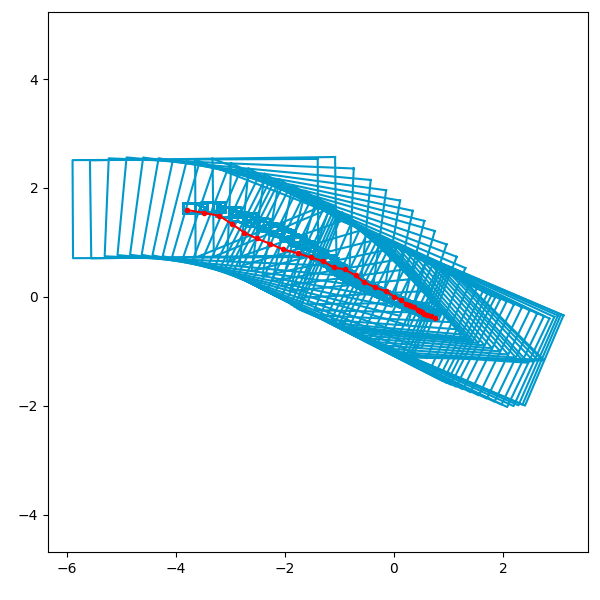
Visualization results can be found under <checkpoint-dir>/visualization/<scenario-index>-<segment-index>-stacked.png.
Legends:
The red line is the reference line.
Blue bounding boxes are tracked states.
Transition between each pair of consecutive states follows the kinematics of the bicycle model.
System Design of Python-Side Framework
SB3-BaseAlgorithm
├── SB3 hyper-parameter
├── SB3 components
└── TrajectoryTrackingEnv
    ├── observation_space
    ├── action_space
    ├── ObservationManager
    │   ├── ReferenceLineManager
    │   │   └── ReferenceLine
    │   └── DynamicsModelManager
    │       List[DynamicsModel]
    │           ├── HyperParameter
    │           ├── State
    │           ├── Action
    │           └── step()
    ├── reset()
    │   └── random_walk()
    └── step()
        └── compute_reward()
Deploying DRLTT
DRLTT provides both Python SDK (PyTorch JIT-based/standalone) and C++ SDK (based on LibTorch).
DRLTT Python SDK (PyTorch JIT-based) (Recommended)
This Python SDK is based on PyTorch JIT, and thus requires a PyTorch installation. A simple demonstration has been given in the section “Try out Pre-trained Checkpoints”. For more comprehensive usage, readers are referred to:
simulator/trajectory_tracker/trajectory_tracker.pyfor docstring and implementation;simulator/trajectory_tracker/trajectory_tracker_test.pyfor usage.
DRLTT Python SDK (Standalone)
This Python SDK is based on pybind. This SDK is able to run without PyTorch installation.
sdk/assets/exported-python-sdk/trajectory_tracker.pyfor docstring;sdk/assets/exported-python-sdk/README.mdfor description;sdk/assets/exported-python-sdk/check_export_symbols.pyfor usage/example.
NOTE: Currently, this version of standalone SDK is compatible with PyTorch installation. This is due to the incompatibility between the shared libraries of PyTorch and LibTorch. The authors are dealing with this issue and will update the availability once this SDK is ready again.
DRLTT C++ SDK
For C++ SDK, see the DRTLL SDK page for details.
Development
Testing
Run ./test/test.sh to test all code and documentation:
#!/bin/bash

work_dir=./test-log
if [[ -d $work_dir ]];then
    bak_work_dir=${work_dir}-bak
    if [[ -d ${bak_work_dir} ]];then rm -rf ${bak_work_dir};fi
    mv ${work_dir} ${bak_work_dir}
fi
mkdir -p $work_dir

test_script_dir=$(dirname $0)

./${test_script_dir}/test-python.sh "$@"
./${test_script_dir}/test-cpp.sh "$@"
./${test_script_dir}/test-doc.sh "$@"
Check out test logs under ./test-log/.
For more details about testing of DRLTT, please refer to DRLTT TEST
Code Formatting
This project uses black for Python code formatting and clang-format for CXX code formatting according to Google Python Style Guide and Google C++ Style Guide, respectively:
#!/bin/bash

echo FORMATTING PYTHON CODE...
black --config ./configs/code_formatting/pyproject.toml ./

pushd ./sdk
    bash ./format-code.sh
popd
References:
Configuring vscode
.vscode/settings.json
{
    "python.analysis.extraPaths": [
        "${workspaceFolder}",
        "${workspaceFolder}/common/proto/proto_gen_py",
        "${workspaceFolder}/submodules/waymax-visualization"
],
    "C_Cpp.default.includePath": [
        "${workspaceFolder}/sdk",
        "${workspaceFolder}/common/proto/proto_gen_cpp"
    ]
}
Citation
If you wish to cite this work, you may consider using the following reference form:
Xu, Yinda, and Lidong Yu. "DRL-Based Trajectory Tracking for Motion-Related Modules in Autonomous Driving." arXiv preprint arXiv:2308.15991 (2023).